I’ve been using WordPress since the early days, 2006 to be exact.
I fell in love with the idea of open-source CMSs a few years before that, after experiencing firsthand how cumbersome and expensive closed-source CMSs were. The big open source players at the time were Drupal and Joomla, but then WordPress came along and changed the game.
After seeing how much easier WordPress would be to explain to my clients when compared to Joomla (named Mambo in those days), I made the switch immediately and also started blogging about this exciting piece of software that was going to “democratize publishing”.
I had been blogging for a few years by then, using the limited functionality of Blogger. I switched my site to WordPress and started WP Mayor to share my new knowledge with the rest of the world and also act as a testbed for me to implement things.
I can say that there were 3 main things that attracted me to WordPress in 2006:
- Ease-of-use
- Technically accessible
- Community
First, it was very easy to use WordPress straight out of the box, provided you knew how to set up a domain and basic hosting service, which wasn’t a problem for me given I had been working as a web developer for several years by then.
Secondly, it was also technically accessible. I had started computer science and business at University, but I could not claim to be a hardcore developer. I knew enough PHP and MySQL to build a basic CMS and modify HTML/CSS templates. That’s all I needed to know to customize WordPress websites. I could also build my own WordPress plugins fairly easily. It took me a while to go down that road, but eventually, I built WP RSS Aggregator, which, like WP Mayor, is still around today and doing great.
Thirdly, the community. One of the reasons why it was so easy to get started with WordPress was that there were some great forums, including the official one, where you could easily get help in doing anything WordPress-related, and for free! There was a spirit of generosity and sheer excitement at building an amazing product that would change people’s lives and give a voice to anyone on the planet.
Fast forward a decade and a half, and I am still a WordPress user. This very blog runs on WordPress. However, my feelings towards WordPress have changed over the years. While it remains an excellent product that can certainly deliver the goods (after all, it powers 35% of the world’s websites, according to some estimates), I have a few big gripes that might even jeopardise the product’s future, and that’s what I want to note down in this post.
First – A Little Bit of WP History
Let me take you on a brief history on WordPress from my perspective.
WordPress started life in 2003 as a fork of b2/cafelog by Matt Mullenweg and Mike Little. Although WordPress is the official successor of b2, another project, b2evolution, is also in active development.
The idea for the fork came to Matt when the main developer of b2, Michel Valdrighi, stopped making updates to the platform. Matt announced the idea on his blog and Mike Little replied saying he was interested in contributing.
In the following months, Matt and Mike made several changes to the codebase (PHP, MySQL, HTML and CSS), however Matt was clearly the one with bigger dreams and ideas for WordPress. He registered WordPress.org.
In 2004 the licensing terms for the competing Movable Type package were changed by Six Apart, resulting in many of its most influential users migrating to WordPress. This was the stroke of luck that changed the course of CMS history forever. If it weren’t for this disastrous move by Movable Type, things would have probably looked a lot different today, as Movable Type was a clear leader in those days.
When WordPress was forked from b2/cafelog, it was squarely meant to be a blogging platform, and it became the undisputed best blogging platform very quickly as users flocked to it from Blogger (a very limited tool) and Movable Type.
By this time, Matt Mullenweg was the clear leader of the project, and he also founded Automattic in 2005 to focus on building WordPress-related commercial software and services. That company now employs more than a thousand people and is currently valued at more than $3 billion today. It has acquired several other companies.
The WordPress core group then decided to take on the CMS space, and compete directly with Joomla and, to a certain extent, Drupal. Concepts were borrowed from these two CMSs and custom post types were introduced, which really changed the game and made WordPress the definite no.1 piece of software to use by web developers building medium complexity sites for clients, and not just blogs. Drupal was still regarded as a better option for high complexity sites, while Magento was the e-Commerce leader.
The next big shift in 2014 came when the leadership announced that the focus would shift to making WordPress an API, where the front and back end admin panels could be built with any other language and interface with the WordPress database, giving ultimate flexibility to web developers. The REST API was the solution, and a lot of energy was spent on Calypso, the desktop app meant to showcase this new WordPress concept. It was a cool piece of software but the REST API was way too limiting to make it a viable alternative to using the traditional wp-admin dashboard for anything beyond writing simple blog posts.
In the meantime, e-Commerce solutions on WordPress were getting more and more sophisticated. WooCommerce (a fork of Jigoshop by themes titan WooThemes in 2011) was emerging as the clear leader, and was acquired by Automattic for over $30mln in 2015, along with the rest of the WooThemes business and team. I think this was a pivotal point that really made it clear to everyone that Automattic was the clear juggernaut of the WordPress space and the company could and would do anything it wanted to profit from the WordPress software and community. Speculation immediately started about whether Automattic wanted to make a hosted version of WooCommerce. This move has not materialized yet but most people take it as a given to happen in the next few years.
Calypso never really picked up steam, and suddenly the focus changed on redoing the way people created content with WordPress. This consisted of replacing the TinyMCE editor used on the wp-admin interface and instead use a newly built tool called Gutenberg. Undoubtedly, this was due to platforms such as Wix and Squarespace providing a much simpler interface for new users, making it clear that something had to change for WordPress to keep up.
Although Gutenberg has been the main focus of the WordPress core theme for over three years, it has still not won over the hearts of users, and the Gutenberg plugin in fact is one of the worst-rated plugins in the repository. The hope is that long-term the kinks will be ironed out and old school users will learn how to use Gutenberg while newer ones will immediately find themselves at ease with the more modern interface it provides.
I’m not sure how this will end, all I can say is that I’ve tried Gutenberg and I wasn’t convinced. Probably because I’m set in my ways and I had no real incentive to change the way I create content, so Gutenberg was a big annoyance more than anything. I do agree, however, that for younger users there needs to be a better way of content editing that is more akin to the interfaces they are used to. Whether it will be Gutenberg or something else remains to be seen. Certainly, third party tools like Elementor seem to receive much more love from users.
And that’s where we are at in 2020 as far as I’m concerned. Now on to a few concerns and gripes that have risen over the past few years.
1. Changing WordPress Narrative
As I’ve described, WordPress has morphed from a blogging system, to a CMS, then to an app platform at the database level using APIs. Currently, I’m not even sure what WordPress is trying to be anymore. Is Gutenberg a step towards becoming the top blogging/CMS tool once again?
What is the role of WooCommerce in all this? We know it’s a huge profit center for Automattic and has a big slice of the overall e-commerce market, but it also has serious rivals like Shopify to contend with. As with Wix and Squarespace, these hosted tools have focused on one thing right from the start, while WordPress has been changing and trying to accommodate everything that is thrown at it over the past decade and a half.
2. A Different Web
The web itself has changed a lot since WordPress came to be, and Javascript frameworks are now all the rage. The WordPress codebase now has a much bigger percentage of JS than PHP, and this has been tough on many WP developers who have had to learn a new language in order to keep up.
Apart from the technical considerations that have changed, the online expectations of users have changed as well.
Ten years ago, there was a strong focus on owning your content and open-source platforms were very popular. Nowadays, it’s all about convenience and most users don’t give a hoot about owning their content. You know things have changed a lot when people are writing their blog posts as Instagram posts rather than having a website. It’s insane to me, but realistically that is where the trend is going.
Our lives have gotten busier and users are accustomed to hosted platforms like Facebook, Instagram, Youtube, Wix, Shopify etc. and value the convenience they provide. They don’t care about giving up ownership of their content or about having central organisations that can deactivate their accounts if they feel like and censor them with ease.
3. A Powerful Few Companies Rule
The early days of WordPress were characterised by people who were genuinely motivated about democratising publishing, making good software available to everyone at free or low cost. As WordPress grew and companies like Automattic became extremely profitable, things changed, and I think nowadays it’s all about making money.
It is impossible for a clan of powerful companies not to form in such situations. At present, I see Automattic and a few other big WordPress players who really determine the future of WordPress, as well as have tremendous power commercially. In the plugin space, for example, you have companies that focus purely on acquiring other successful plugins, then cross-promoting their plugins, leaving little chance for other players to compete, let alone new entrants.
I won’t even get into the confusion created between WordPress.com and WordPress.org, with WordPress.com being fully owned by Automattic and a big revenue driver for them, while WordPress.org is where you can actually download WordPress the software. Most new users will naturally gravitate towards the .com domain and then have to figure it out on their own.
4. Hard to Attract Talent
WordPress is no longer the cool kid on the block, and it’s hard to attract talented developers to dedicate their time to WordPress-related development. There are way cooler programming languages and projects that attract them these days. Add to that the fact that many of the existing long-time WP developers don’t really have strong JS skills and it’s really hard to find people.
I can’t blame talented coders who shy away from WordPress due to its antiquated code or core development teams that frequently resist change.
5. Uncontrolled Growth
WordPress has grown immensely from any data point you look at. Take WordCamp Europe, for example. It’s becoming a challenge to even find a venue that can accommodate the thousands of people who want to attend every year. This particular case might not be a big problem, but it is in other cases.
Take the plugin repository as another example. There are many thousands of plugins, and those which were around in the early days have a huge advantage over new entries, discouraging competition and innovation. As a user, it is a nightmare to find the most suitable plugin for your needs. Are we really expecting users to download and test 10 seemingly identical SEO/caching/contact form/social media plugins to decide which one they like best?
It’s also harder to control the quality of the plugins found in the repository, presenting a security nightmare because who knows if the next plugin you install is secure or not?
6. The Sense of Community Has Changed
I’ve perhaps already made references to the fact that the community is not the same as it was in the early years. Nowadays the focus at official events is on marketing and making money, while the official forums are not quite as helpful and tolerant as they once were. In my opinion, some forum moderators who have been there for many years should have moved on to something else a long time ago.
The reason I say that is that they have grown increasingly cynical, dismissive and outright arrogant over the years. The way they speak at times feels like they know that they are backed by the most powerful corporation in the space and are basically untouchables.
If you don’t know what I’m talking about, take a look at this post or even the screenshot below from a that I randomly came across earlier this week.
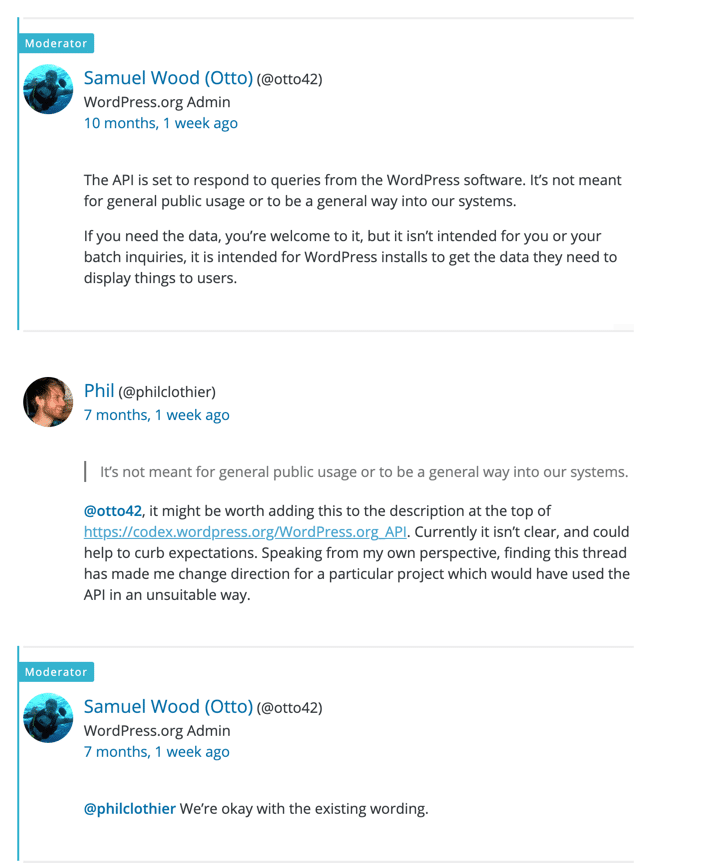
Nothing too dramatic on the face of it, but I don’t think it’s ok to use such a tone when replying to a user who had politely submitted a perfectly formatted and good question and repeatedly thanked the moderators in previous interactions.
At the same time as this brashness and arrogance is on display, we have the powers that be in WordPress becoming more and more espoused to a certain political view of the world. The best term I’ve found to describe how I feel WordPress leadership operates is the Chinese word Baizuo. Here’s an extract from Wikipedia:
the word “Baizuo” refers to those who “only care about topics such as immigration, minorities, LGBT rights and the environment”, but lack a concept of “real problems in the real world”. It is also used to describe those “hypocritical humanitarians who advocate political correctness just to satisfy their own sense of moral superiority”.
I don’t know about you, but this really hits home for me when I think of the WordPress community’s overall feel.
7. Hard to Recommend WordPress
Due mainly to the shift in expectations from the user side, I am finding it harder and harder to recommend WordPress to people these days. This is hard to accept for me as I spent many years being a WordPress evangelist through my writing on WP Mayor. It’s changing narrative is another issue.
Let’s consider a few examples. If a friend calls and says that they:
- want to start a blog – I’m probably going to suggest taking a look at Ghost.
- need to sell products online – Shopify is where I’m going to direct them.
- want to know what frameworks they should learn – Laravel, React, Node are what I’m suggesting.
Perhaps the one use case where I would still recommend WordPress is if they want to build a company website or want to do something else that doesn’t fit tidily into what the hosted services offer. For example, an automated content aggregator about COVID-19 just to cite a recent example. Then yes, WordPress coupled with plugins such as WP RSS Aggregator would definitely be the number one tool for the job in my view.
I do miss the days when I would encourage everyone to have a voice online and promise them that the easiest way to do so was to spend a couple of hours getting their own site set up with self-hosted WordPress.
Final Thoughts
So there we go, this is just me reflecting on my time in WordPress and my current feelings. I’d welcome your views, even if you think I’ve gotten it all wrong. Ultimately, being a WordPress user, I’d really love WordPress to continue flourishing in the next 10 or 20 years and consolidate its position as a leader.
However, my feeling is that WordPress has lost its spark over the years due to the factors I mentioned and others. To make some comparisons, I feel the crypto space nowadays is very similar to the early days of WordPress. I see the same ethos of changing the world for the better, with open source having a strong presence, as well as incredible communities around Bitcoin and other crypto projects.
The uncertainty and frustration at certain decisions and ways of doing things are feelings that are shared by many people, and some have so far as to actually fork WordPress, creating ClassicPress, a project that is described as “Forked from #WordPress, without #Gutenberg. ClassicPress is a business-focused CMS. Powerful. Versatile. Predictable.”
1/2 I've noticed my Twitter feed's proportion of @GetClassicPress-related content is gradually but steadily increasing. This is good. CP has all the benefits of #WordPress without the petty politics, arbitrary decisions and autocratic control.
— ZigPress (@ZigPress) August 19, 2020
It remains to be seen whether a fork like this can have any real impact. In my view, it all hinges on whether they can provide any real benefit to new users versus what WordPress offers. If they manage to achieve that, then it would make sense for plugin developers to adapt their plugins to work with ClassicPress (many do by default since it’s a fork of WordPress) and then they can focus on building a superior plugin repository. Only then can they give WordPress a good challenge.
I’m not sure I’ve managed to accurately convey my thoughts and feelings across in this post, so I might revisit it with more ideas in the near future, but for now, it’s done its job in helping me sort out the things in my head.
Related



Dear Jean, this is probably the best post on this topic on the entire internet.
I really love WordPress. But I realized I hate too many parts of it now. The whole Gutenberg thing is wonderful but having pushed it into the core definitely let many people astonished.
Also, the whole WP codebase is a huge mess. Not long ago I started a WP fork called WinniPress. The idea is to tear away all the bloat and aim towards a clean PHP Framework made for developers.
There is also a quite successful project going on called ClassicPress, but I feel it’s too conservative with compatibility.
To be able to make a fresh version of WP, compatibility must be broken. For the sake of fixing old messy code that has been living there for way too long.
I invite you and your readers to join the project at https://github.com/winnipress so that a clean PHP CMS Framework can become a reality soon!
Thanks Alvaro. Best of luck with WinniPress, however, I’m afraid all forks of WordPress are destined to fail. WP has a huge network effect advantage, and if everything will ever supplant its position it will have to be a completely new system that introduces a new paradigm shift. Or it will be Wix, Squarespace or something similar. More likely, WordPress will continue to morph itself and be “good enough” for the vast majority of potential users, which would ensure that it retains its leadership in the space. However, there’s no doubt that the future of WordPress is more centralized, and the original fundamentals of decentralization and democratisation have been lost along this journey.
“I’m afraid all forks of WordPress are destined to fail”.
I understand what you say. But yeah, I am not seeking a fork that will be better or more used, at all. Just simpler. Much simpler.
Actually I am doing it more for myself, just in public so that anyone can jump in if interested 😉
Fair enough, if it’s a fun side project then it’s all good.
Hello! I just wanted to say that I like ClassicPress a lot. Cheers!
Good to know people are using it.
A great in-depth analysis, Jean. Thank you. What are your thoughts on platforms who have styled themselves as “lean Wordpress alternatives”, going for the market of disillusioned Wordpress users? Ghost, Medium, Contentful, Gatsby?
I’ve been using Ghost, self-hosted, which seems fast and intuitive but lacks a great deal of the plugin infrastructure of Wordpress and the support forums seem, well, somewhat snooty.
I am, in principle, against any platform where you don’t own your own content, such as Instagram, FB, Medium etc.
Ghost is probably the closest alternative to WordPress, however the fact that there is nowhere near as good a plugin ecosystem will always be the main problem for that and other similar platforms.
As I mentioned in the article, WordPress’ biggest strength is its community of dedicated plugin builders, both free and premium. This gives it a huge advantage and possibly insurmountable moat against other platforms, at least in the short term (5 years).
On the flip side, the move towards more JavaScript code has meant that plugin developers have had to either upgrade their skills or hire better developers than themselves. In the past, it was normal for plugin developers to be mainly hobbyists and not true developers. These people would not have had the skills or inclination to develop more complex standalone software or even software that integrates with other platforms that used more complex programming paradigms than functional PHP. As this changes, I also suspect that they will start to think twice about building a plugin for WordPress versus building a stand-alone service (SAAS) that can integrate with any type of platform, given that they now have the skills to do so without too much of a hurdle.
Interesting article Jean. And as always, easy to read.
What do you think of Jamstack and the static site generators ?
Things like Jekyll or Gatsby that promise people to have an almost free way to blog.
We talked on Twitter about Ghost, I think it is based on the JAMSTACK principles.
Thoughts ?
Thanks Gary. I have Jamstack on my list for a deep dive. At this point I don’t know enough about it. I’ll keep updating this post over time probably, and will include my thoughts on that too.
The biggest advantage that WordPress has is the plugin ecosystem, although plugin vendors never really got the respect and support they deserve for making WordPress what it is today, and I foresee a slow but steady switch to other platforms if a real challenger to WordPress becomes apparent.